work / chord progressions
chord progressions
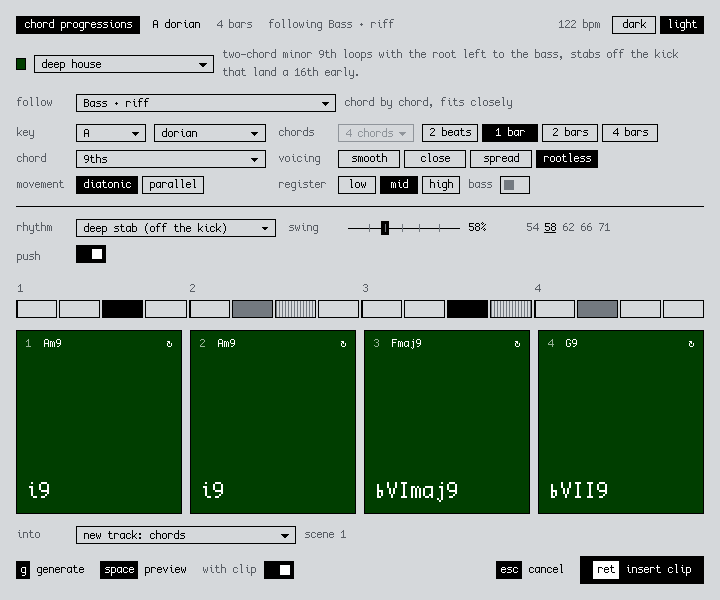
A chord progression generator for Ableton Live, for techno, dub techno and house. Start from scratch or from a bassline or melody, pick a style, and drop the result in as a MIDI clip.
what it does
Right-click a bassline clip → Generate Chord Progression…, pick deep house, hit g until you like it, then insert. The chords land on a new Chords track in the same scene. Bassline does the opposite and writes bass for a chord clip.
You can run it from three places:
| a MIDI clip | writes chords for that clip (a bassline, a melody, or chords you want to restyle) onto a new Chords track or another MIDI track |
|---|---|
| an empty clip slot | from scratch, or following another clip in the scene |
| a time selection | from scratch, or following the clips under the selection |
Each style is built from real progressions, pulled from transcriptions of Kerri Chandler, Masters at Work, Mr Fingers, Inner City, Crystal Waters, MK, Galaxy 2 Galaxy and others. Picking a style sets everything, and you can still change any of it. The chord qualities come with the progression, so all-minor loops like Good Life (i–v–♭vii–iv) work.
| dub techno | mostly one minor 7th, sometimes moved to iv, ♭vii or v, with sparse dotted stabs |
|---|---|
| deep house | two-chord minor 9th loops like i–iv and i–♭vii, root left to the bass, stabs landing a 16th early |
| classic house | Imaj7–IVmaj7, ii–V–I–vi and Chicago minor loops, with a 3-3-4 piano riff |
| detroit techno | i–v–♭vii–iv all minor, or IVmaj7–iii7, with held 9th pads |
| hypnotic techno | one minor stab, sometimes moved to ♭II, ♭vii, iv or v, on offbeat 16ths |
| functional (pop) | tonic, predominant, dominant triads, held |
When it's following a clip, it takes the key from Live's Scale Mode or works it out from the notes. Then it tries every progression in the style against the clip, counting the bass note most and marking down notes that clash, and picks the best fit. Hit g for another good one, and turn on "with clip" to hear your clip under the preview. Sources are in RESEARCH.md.
Chords go from triads up to 11ths, plus sus and quartal, and they're named from the actual notes (Am11, ♭VIImaj9). Voicings are smooth, close, spread or rootless, in a low, mid or high register. There are 23 rhythms, or you can draw your own on the step grid, with swing and push.
Preview plays at the set's tempo, and dub styles get a dotted-8th delay. Click a pad to hear one chord, or ↻ to re-roll it. It remembers your settings.
install
- Download the .ablx above.
- In Live, open Settings → Extensions and drop the .ablx on the page.
- Right-click a MIDI clip or an empty clip slot → Generate Chord Progression…
Needs Live 12 Suite 12.4.5 or later with Extensions, which is in the Live beta for now. It writes MIDI only, so put an instrument on the track, and add Echo for the dub styles.
Menu item missing? Turn off Developer Mode in Settings → Extensions. While it's on, installed extensions don't show up in menus.
how it's built
TypeScript on Ableton's Extensions SDK. The music logic is plain modules with unit tests, and the dialog uses 2sl-ui, the same design system as this site.
We take commissions like this. The first 30 minutes are free: book a consultation or get in touch.
next projectbassline