work / bassline
bassline
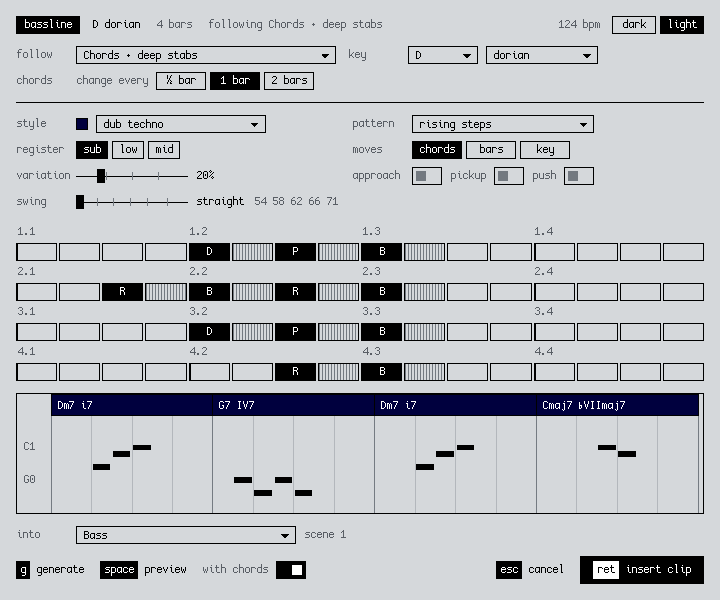
A bassline generator for Ableton Live, the other half of chord progressions. It follows a chord or melody clip, or starts from scratch, and writes bass for techno, dub techno and house.
what it does
Right-click a chord clip → Generate Bassline…, pick dub techno, preview it with the chords and insert. You get a new Bass track with a four-bar riff that follows the changes.
You can run it from three places:
| a MIDI clip | follows that clip (chords or a melody) and writes to a new Bass track or another MIDI track |
|---|---|
| an empty clip slot | follows another clip in the scene, or starts from scratch |
| a time selection | follows the clips under the selection, or starts from scratch |
The key comes from Live's Scale Mode, or it's detected from the clip and you can change it. From scratch it uses the same engine as chord progressions.
| dub techno | rising steps in the sub, about three notes a bar around the ♭7, with a four-bar call and response |
|---|---|
| deep house | a syncopated two-bar riff on root, octave and seventh, 56% swing |
| classic house | a jacking riff with push and 54% swing |
| detroit techno | dotted 8ths, moving a 16th ahead of the chords |
| hypnotic techno | rolling 16ths between the kicks, droning on the key |
| functional (pop) | root and fifth, with approach notes |
The patterns come from records. Rising steps is modelled on Rhythm & Sound's Never Tell You, and the dotted 8ths on Inner City's Good Life. The rules are the ones those records share: repeat the riff, leave room for the kick, and save the changes for the end of the phrase. Sources are in RESEARCH.md.
You can swap the pattern or draw your own on the step grid, where each step is a role like root, octave, fifth or seventh. Variation goes from none, where the riff repeats exactly, up to a few changes and a new ending for each phrase. There's also register, approach notes, pickup, push and swing.
The bass is always mono. Accents come out as two velocities, so map velocity to your synth's filter.
install
- Download the .ablx above.
- In Live, open Settings → Extensions and drop the .ablx on the page.
- Right-click a MIDI clip, an empty clip slot or a time selection → Generate Bassline…
Needs Live 12 Suite 12.4.5 or later with Extensions, which is in the Live beta for now.
Menu item missing? Turn off Developer Mode in Settings → Extensions. While it's on, installed extensions don't show up in menus.
how it's built
TypeScript on Ableton's Extensions SDK, sharing its music code with chord progressions. The dialog uses 2sl-ui, the same design system as this site.
We take commissions like this. The first 30 minutes are free: book a consultation or get in touch.
next projectgain stage